CARVIN
Moderate5 min7 steps·Original on iFixit ↗

Sony Smart Watch SW2 Battery Replacement

This guide will teach you how to safely replace the battery for the Sony Smart Watch SW2.

Tools (2)

Step-by-step instructions

Step 1 · photo 1
1
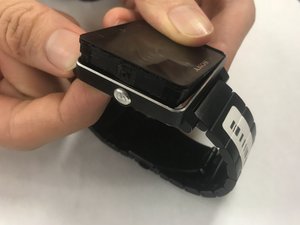
  • Detach the smart watch from the band by pushing on the back of the watch housing.
  • The power button may fall out once the smart watch is detached.
  • Set aside the power button and watch band as they are no longer needed for further disassembly.
Step 1 · photo 1
1
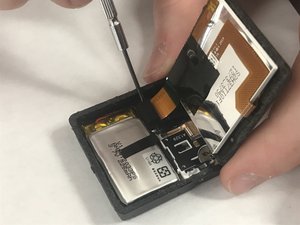
  • Lift one side of the battery up carefully. There is a thin black circuit adhered to the back of the battery that connects to the motherboard and the charger.
  • The connection is already broken in this image and you will not be able to lift the battery this high.
Step 2 · photo 1
2
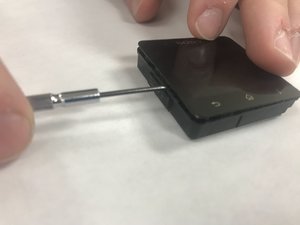
  • Use a plastic opening tool to carefully pry the LCD screen from the watch housing.
Step 2 · photo 1
2
  • Push the black piece down while very carefully pulling the battery off. Work your way around without lifting the black piece up too much.
Step 3 · photo 1
3
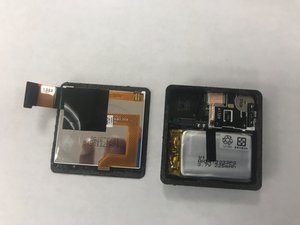
  • Use a plastic opening tool or spudger to lift the screen assembly press-fit connector free.
Step 3 · photo 1
3
  • Once the battery is free from the frame adhesive, [https://www.ifixit.com/Guide/How+To+Solder+and+Desolder+Connections/750|desolder] the black and red battery wires.
  • Remove the battery.
Step 4 · photo 1
4
  • Set aside the detached LCD screen to access the battery.

Conclusion

To reassemble your device, follow these instructions in reverse order after the battery is replaced.

Guide content belongs to iFixit, license CC BY-NC-SA. Open original

Замена аккумулятора Sony Smart Watch SW2 — Carvin Garage · Carvin