CARVIN
Very easy1 - 5 min4 steps·Original on iFixit ↗

Honda civic 2016 Keyless Remote Battery Replacement

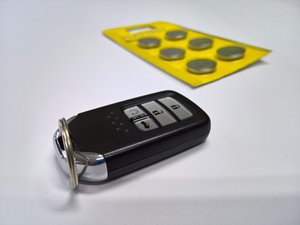
Honda Civic 2016 uses Keyless Remote to start the engine in addition to a normal lock/ unlock mechanism. Without battery, the car cannot be started. This guide show how to replace the Lithium battery inside Honda Civic 2016 Keyless Remote.

Tools (1)

Parts (1)

Step-by-step instructions

Step 1 · photo 1Step 1 · photo 2
1

Let's get started

  • Make sure to have replacement battery ready. You will need 1 pc of CR 2032 Lithium battery.
  • Remove the metal key by sliding the switch on the back of the remote and pulling the key out.
Step 2 · photo 1Step 2 · photo 2Step 2 · photo 3
2

Cracking it open

  • After removing the key, you will see 2 plastic bars. This is a place where you can split the remote open.
  • The manufacturer recommeded using a coin but any hard tool or even the key itself will work as well.
  • The manufacturer recommended using a cloth covering your coin/ tool to prevent it from denting the plastic bars.
Step 3 · photo 1Step 3 · photo 2Step 3 · photo 3
3

Removing the battery

  • Now you can gently pry it open
  • Removing the old battery from the left side.
  • ''Remember that the + side of the battery is facing up.''
Step 4 · photo 1Step 4 · photo 2
4

Inserting a new battery

  • Inserting a new CR 2032 battery from the right side first and then press the battery down. It should make a good 'click' sound
  • ''Again, make sure the + side of the battery is facing upward.''

Conclusion

To reassemble your device, follow these instructions in reverse order.

Guide content belongs to iFixit, license CC BY-NC-SA. Open original

Замена аккумулятора пульта дистанционного управления Honda civic 2016 г. — Carvin Garage · Carvin