CARVIN
Easy5 - 10 minutes6 шагов·Оригинал на iFixit ↗

2006-2011 Honda Civic Key FOB Battery Replacement

In this guide, we will replace the battery of a 2006-2011 Honda Civic key FOB. This is a fairly simple project that can be completed rather than potentially spending a minimum of $90 on a replacement.

Инструменты (1)

Запчасти (1)

Пошаговая инструкция

Шаг 1 · фото 1
1
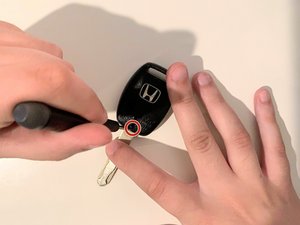
  • Using the Phillips #0 screwdriver, remove the single screw from the bottom of the key FOB.
Шаг 2 · фото 1
2
  • Gently lift the outer shell and remove it from the rest of the device.
  • Be careful not to break the clip located at the hole for the key ring that holds the shell in place.
Шаг 3 · фото 1
3
  • Remove the inner shell from the outer shell by pushing the buttons to loosen the inner shell.
Шаг 4 · фото 1
4
  • Unclasp the inner shell using the clips on the top and bottom.
  • Careful as to not break the clips as it keeps moisture, dust, and dirt from entering the delicate electronics.
Шаг 5 · фото 1
5
  • Remove the battery inside of the inner shell of the key FOB.
  • If the battery is corroded, make sure to wear gloves due to battery acid.
  • Do not puncture the battery when removing the old one/placing a new one.
Шаг 6 · фото 1
6
  • Replace the old battery with a new one.

Завершение

To reassemble your key FOB, follow these instructions in reverse order.

Контент гайда принадлежит iFixit, лицензия CC BY-NC-SA. Открыть оригинал