CARVIN
Moderate10 - 30 min8 steps·Original on iFixit ↗

POLAR CADENCE SENSOR BLUETOOTH® SMART Battery replacement

Polar is producing fine gear for athletes giving them the information about their training. Usually only delivered Polar software lacks of updates but with the cadence Sensor same as the speed sensor, Polar managed to make a simple battery change a mess. I’ll show you how to successfully change the battery of the POLAR CADENCE SENSOR BLUETOOTH® SMART.

Step-by-step instructions

Step 1 · photo 1
1

The Sensor

  • Removed Cadence Senosor from frame
Step 2 · photo 1Step 2 · photo 2Step 2 · photo 3
2

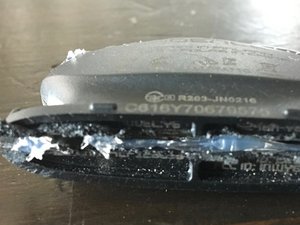
Cutting open the Sensor

  • Either use hacksaw or Dremel to cut open downside of the sensor. Use the carve of the body for guidance.
Step 3 · photo 1Step 3 · photo 2Step 3 · photo 3
3

Behind the circuit board lies the truth

  • After cutting the downside, sensor can easily be opened. Remove circuit board with care not to break the pin. Remove copper clamp with [product|IF145-020|tweezers].
Step 4 · photo 1
4
  • Replacing the battery
5

First test of the new battery

  • Move magnet close to diode. Flashing indicates successful replacement
Step 6 · photo 1Step 6 · photo 2
6

Glueing it up

  • Glue it up (maybe nicer than I did)
7

2 Function Test

  • Second functional test with glued chasis
Step 8 · photo 1
8
  • Bonus IC Identification:
  • Texas Instruments [link|https://www.ti.com/product/MSP430F5502|MSP430F5502] 16-Bit Microcontroller w/ 24 KB Flash
  • Nordic Semiconductor [link|https://www.nordicsemi.com/products/nrf8000-series|nRF8001] Bluetooth Low-Energy Transceiver

Conclusion

To reassemble your device, follow these instructions in reverse order.

Guide content belongs to iFixit, license CC BY-NC-SA. Open original

POLAR CADENCE SENSOR BLUETOOTH® SMART Замена батареи — Carvin Garage · Carvin