CARVIN
Moderate20 - 40 minutes6 шагов·Оригинал на iFixit ↗

Tektro Aires Disc Brakes Brake Pad Replacement

This guide is to replace your Tektro Aires Disc Brakes pad, the guide will show you step by step with instructions and pictures. you may need to replace your brake pads due to wear or damage. To complete the replacement you will need to use the tools mentioned (1x5 mm Hex Key, 1 x Large needle nose pliers) on the steps that they're needed for. It is recommended to wear gloves as skin oils will affect the brake pad's performance. (If not be careful not to touch the brake pads when reinstalling)

Инструменты (3)

Запчасти (1)

Пошаговая инструкция

Шаг 1 · фото 1
1
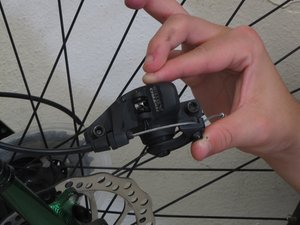
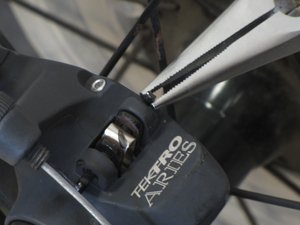
  • Bend the retention pins straight using a pair of needle nose pliers.
Шаг 2 · фото 1Шаг 2 · фото 2
2
  • Loosen the two mounting bolts using a 5mm Hex Key.
  • Different bike models will have the mounting points in different locations.
Шаг 3 · фото 1
3
  • After removing the bolts pull of the brake caliper from the brake disc.
Шаг 4 · фото 1
4
  • Using the needle nose pliers remove the retention pin by pulling on it.
Шаг 5 · фото 1
5
  • Remove the brake pads by pulling on them and releasing them from the caliper.
Шаг 6 · фото 1
6
  • Place the spring on the new Tektro Disc Brake Pad as shown.
  • The other brake pad will go on the spring opposite the first brake pad.

Завершение

  • The steps for the front wheel are the same as the back wheel.
  • Follow steps in reverse for reassembly.

Контент гайда принадлежит iFixit, лицензия CC BY-NC-SA. Открыть оригинал

Tektro Aires Disc Brakes Brake Pad Replacement — Carvin Garage · Carvin