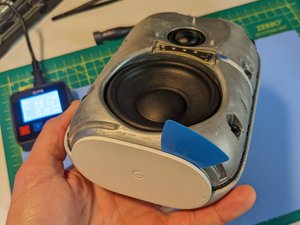
The front cover of the device is made of recycled plastic and is press-fit onto the body. It's connected to the body by a flex cable, which can be disconnected easily by hand.
To remove the front cover, insert a simple pick into the seam between the front and back housing and gently pry along the seam.
💬If the cover is difficult to remove, you may need to use a flathead screwdriver to rotate and lift it off the body.
As the front enclosure starts to loosen, it will begin to "pop" off. Carefully flip up the front enclosure to access the flex cable, and disconnect the cable to remove the front enclosure.
⚠️On the underside of the outer front enclosure, you'll find the touch sensors and a small daughter board secured by three Torx Plus (IP) screws.
2
Light Board Removal
The LED light bar is fastened to the aluminum body with two T6 screws.
Gently disconnect the flex cable from the light bar using [product|IF145-020|tweezers] or pliers. Pull on the plastic tab carefully since the cable is very delicate.
✓Using a standard T6 driver, remove the two screws that secure the LED board to the body, and remove it.
3
Plastic/rubber foot removal
The device has a recycled plastic and rubber foot attached to its bottom. This foot prevents scratches on surfaces like wood, dampens vibrations, and covers the re-flash port. It's held in place by a light seam of adhesive that's easily compromised.
Use a controlled heat source to warm the foot and loosen the adhesive.
Insert a pick between the foot and device body and gently pry them apart. If the foot is heated adequately, it should be easy to pop off.
4
Rubber Receivers Removal
⚠️The aluminum body has six rubber plugs that press-fit into it to hold the front enclosure in place. These plugs need to be removed to access the body screws.
Use tweezers or pliers to grab onto the rubber plugs, and gently pull them out. They should pop out easily.
5
Body screws removal
Once you've removed the rubber plugs, you'll see that six T10 screws secure the metal core of the device to the back plastic/fabric enclosure cover.
⚠️Using a T10 driver, remove the six screws.
6
Back Enclosure Cover Removal
After removing all six T10 screws, you can flip off the back cover. The cover has a small daughterboard for the mute switch connected by a small flex cable. To prevent any strain on the flex cable, rotate the cover up towards the top of the device.
⚠️Carefully disconnect the flex cable.
7
MLB Flex Cables
At this point, the inner metal core is still sealed, but you should be able to see the main logic board (MLB). However, it's not necessary to remove the MLB to access the speaker. We're only removing it here because this is a teardown.
✓Gently pull on the plastic pull tabs with your fingers, tweezers, or pliers to disconnect the flex cables from the MLB.
8
MLB Removal
⚠️Unfasten the seven T6 screws that attach the MLB to the metal core.
Remove the MLB from the metal core body.
9
Daughter Board Removal
There's a separate daughter board that holds the barrel jack power receptacle, distributes power to the MLB and offers a connection terminal for all of the speaker wires.
⚠️Disconnect the audio cables from the white connector port.
⚠️Unscrew the five T5 screws.
💡Once the daughter board is free from the metal core, carefully disconnect the main power flex cable that travels to the MLB.
10
Core Screw Removal
The body is formed by a recycled aluminium half and a recycled magnesium half in a clamshell fashion.
Unfasten the six T10 screws that hold the metal core together.
11
Core separation
💬Even after all of the metal core screws have been removed, the two metal halves may not immediately separate. Although there's no adhesive you have to worry about, the parts are pressed together along a gasket with a weak black tape seal along the perimeter. It may be the case that you have to gently pry them apart.
Using a flathead screwdriver, simply insert it into the seam between the two halves and rotate to separate the two metal halves.
12
Speaker cables
⚠️Without straining the cables, reach into the core to remove the four spade electrical wire connectors. (I was able to do this without a tool.)
13
Speakers Removal
⚠️Using a T6 driver, remove the six screws holding the speakers.
💬The large speaker is heavy and very magnetic, so be careful when handling it.
Lift the speakers out of the housing.
Контент гайда принадлежит iFixit, лицензия CC BY-NC-SA. Открыть оригинал