CARVIN
Moderate5 minutes4 шагов·Оригинал на iFixit ↗

Nintendo Wii Remote Front Cover Plate and Batteries Replacement

Disassembling the case requires removing screws under the batteries. Removing anything inside requires this guide.

Инструменты (2)

Пошаговая инструкция

Шаг 1 · фото 1Шаг 1 · фото 2
1
  • Flip the Wii Remote over so the battery cover faces you.
  • Push up on the bottom tab.
  • Remove the battery cover.
Шаг 2 · фото 1
2
  • Remove the first battery by pressing down on the positive end and pulling the battery out.
  • Remove the second battery by pushing up on the positive end and pulling the battery out.
Шаг 3 · фото 1
3
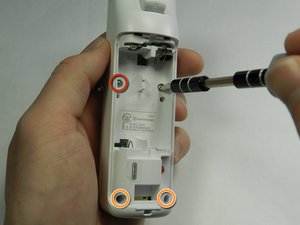
  • Using a tri-point Y1 Screwdriver, remove the two center 7mm screws by turning them counterclockwise.
  • Repeat with the two bottom screws.
Шаг 4 · фото 1Шаг 4 · фото 2
4
  • With the flat end of a spudger, gently apply pressure to the tabs located on left side of the controller.
  • These tabs are breakable. However, if the tabs are broken the controller will still function.
  • Open the front plate like a book.
  • Small parts may fall out as you open the front plate.

Завершение

To reassemble your device, follow these instructions in reverse order.

Контент гайда принадлежит iFixit, лицензия CC BY-NC-SA. Открыть оригинал

Nintendo Wii Remote Front Cover Plate and Batteries Replacement — Carvin Garage · Carvin