CARVIN
Easy10 minutes8 шагов·Оригинал на iFixit ↗

2013 Nissan Rogue Key Fob Battery Replacement

Is your 2013 Nissan Rogue Key Fob not working properly, or isn't working at all? It might be time to replace the battery, and while it's open, take the time to clean out the inside.

Fob batteries needs to be replaced every 3 years to work at maximum range and not sporadically fail.

This guide demonstrates how to replace the battery and clean out your 2013 Nissan Rogue Key Fob.

Инструменты (4)

Пошаговая инструкция

Шаг 1 · фото 1Шаг 1 · фото 2
1
  • Slide the small tab on the back of your fob to the left.
  • While holding the tab to the left, pull the metal key out from the top of your fob.
Шаг 2 · фото 1
2
  • Insert your opening pick into the small gap between the two halves of the fob and lightly pry until they separate.
Шаг 3 · фото 1Шаг 3 · фото 2Шаг 3 · фото 3
3
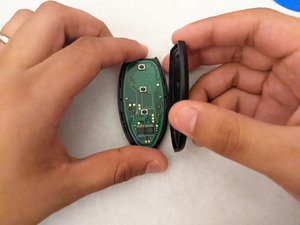
  • Pull the two halves of the fob apart.
  • Remove the two internal housings.
Шаг 4 · фото 1
4
  • Remove the battery.
Шаг 5 · фото 1Шаг 5 · фото 2Шаг 5 · фото 3
5
  • Lightly saturate a cotton swab with 70% isopropyl alcohol and wipe down the inside of the shells and the rubber pad.
  • For any small crevices dip, the toothpick into the alcohol and clean any dirt or debris.
  • Avoid wiping the circuit board and any metal components.
Шаг 6 · фото 1
6
  • Once the alcohol is dried, place a new battery into the battery housing with the proper orientation.
Шаг 7 · фото 1Шаг 7 · фото 2Шаг 7 · фото 3
7
  • Replace the internal components and click the two halves of the fob back together.
Шаг 8 · фото 1Шаг 8 · фото 2
8
  • Slide your key back into its housing.

Завершение

Your fob should now be fully functional!

Контент гайда принадлежит iFixit, лицензия CC BY-NC-SA. Открыть оригинал

2013 Nissan Rogue Key Fob Battery Replacement — Carvin Garage · Carvin