CARVIN
Moderate10 minutes6 шагов·Оригинал на iFixit ↗

2008 Toyota Corolla Battery Replacement

This guide will show you how to replace the battery in a 2008 Toyota Corolla. To get started, ensure the vehicle is parked in a safe place and turned off. Place the vehicle in park and engage the parking brake. Be sure to prepare baking soda mixed with water to clean the terminals.

Инструменты (4)

Пошаговая инструкция

Шаг 1 · фото 1Шаг 1 · фото 2
1
  • Open the car hood.
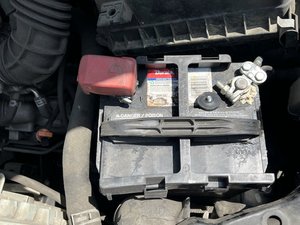
  • The battery will be located on the bottom right.
Шаг 2 · фото 1Шаг 2 · фото 2
2
  • There are two terminals on the battery. The positive terminal is on the left with the red cover. The negative terminal is on the right.
  • Unscrew the bolt to loosen the negative terminal.
  • Remove the negative terminal from the battery.
Шаг 3 · фото 1Шаг 3 · фото 2
3
  • Take the red cover off the positive terminal.
  • Unscrew the bolt to remove the positive terminal.
  • Loosening the screws of the terminal can be difficult. In the first picture, I used pliers to help loosen up the screw holding the terminal tight.
Шаг 4 · фото 1Шаг 4 · фото 2Шаг 4 · фото 3
4
  • Disconnect the battery's terminals from the battery, and remove the old battery.
  • Batteries, over time, tend to get dirty. You can mix baking soda with water and use a brush to clean your terminals.
Шаг 5 · фото 1Шаг 5 · фото 2Шаг 5 · фото 3
5
  • Once everything is clean, you can begin installing your new battery.
  • Install your new battery in the correct space. You will install the negative terminal first, then the positive terminal.
  • Before moving on, make sure each screw on the terminal is tight and secured.
Шаг 6 · фото 1
6
  • Ensure that every bolt is secured.
  • Start your car and let your car run for a couple of minutes.

Контент гайда принадлежит iFixit, лицензия CC BY-NC-SA. Открыть оригинал