CARVIN
Moderate40 minutes8 шагов·Оригинал на iFixit ↗

1998-2001 Nissan Altima Battery Replacement

This guide will show you how to replace the battery in a 1998-2001 Nissan Altima.

If turning the key in the ignition doesn't turn your car on, or the battery light turns on in the dashboard, it may be time to change out your car battery. Typical car batteries can have a 3-4 year lifespan but will vary from driver to driver; when batteries with corrosion aren't cleaned it can lead to serious damage to the clamps/terminals and a dead battery renders the car unusable.

Before using this guide, make sure to run through any other possible reasons for the car not turning on with the use of an OBD reader (car diagnostic scanner).

When following this guide, it's crucial to ensure that the engine is completely shut off to avoid injuries; additionally, make sure to never leave the wrench on the car battery. When not in use, place it to the side or in your pocket. If changing the battery doesn't allow your car to start it's recommended to run an OBD reader to identify further issues or take it to a mechanic for professional help.

Remove the key from the ignition, make sure the engine is off, and engage the parking brake before beginning this repair.

Инструменты (4)

Пошаговая инструкция

Шаг 1 · фото 1
1
  • Open the hood of the car by pulling the lever until you hear the hood pop open.
  • Wear protective gloves when dealing with a car battery to protect against potential battery acid.
Шаг 2 · фото 1
2
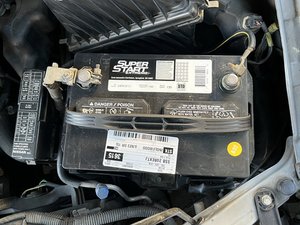
  • With the hood now open, identify the battery and the part number.
  • When replacing the battery, make sure that the new battery and old battery have the same part number to avoid issues.
Шаг 3 · фото 1Шаг 3 · фото 2Шаг 3 · фото 3
3
  • Use a torque wrench with a 9 mm attachment to unscrew the negative clamp and remove it from the terminal. Do the same with the positive terminal.
  • Make sure that no metal pieces touch the terminals at the same time, and that the clamps don't touch each other.
Шаг 4 · фото 1Шаг 4 · фото 2Шаг 4 · фото 3
4
  • If the terminals are corroded, take the corrosion brush and insert the terminal into it and turn until the corrosion is gone.
  • If there is no corrosion, go to the next step.
Шаг 5 · фото 1Шаг 5 · фото 2Шаг 5 · фото 3
5
  • Remove the battery from the base.
  • Be careful as the battery is heavy. To prevent leakage of battery acid, never turn it upside down.
  • Wipe down the base and clamps with a damp rag to remove any dirt or dust that might be present.
Шаг 6 · фото 1Шаг 6 · фото 2Шаг 6 · фото 3
6
  • Dry the base and clamps fully with a dry rag.
  • The clamps must be fully dry.
  • Place the new battery into the base, making sure that the bracket on the bottom is in place.
Шаг 7 · фото 1Шаг 7 · фото 2Шаг 7 · фото 3
7
  • To prevent corrosion, you can place dielectric grease or petroleum jelly on the terminal before placing the clamps, but it isn't necessary.
  • Place the clamps onto the terminal.
  • Screw the negative clamp on first.
  • Don't screw it on too tight.
  • Repeat this step with the positive clamp.
Шаг 8 · фото 1
8
  • Remove all tools from the battery.
  • Make sure to keep track of the time your battery has been in your car. They should be replaced every 3-4 years.
  • Do not throw away old batteries. They can be taken to most automotive shops to be discarded safely and appropriately.

Контент гайда принадлежит iFixit, лицензия CC BY-NC-SA. Открыть оригинал

1998-2001 Nissan Altima Battery Replacement — Carvin Garage · Carvin