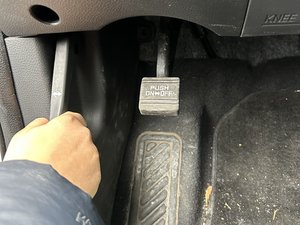
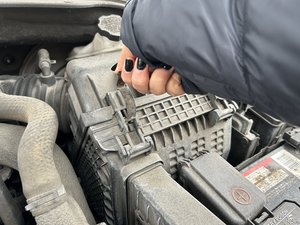
- Make sure the car is parked and turned off.
- Pull the hood release lever at the bottom left of the driver side footwell to open the car hood.
- Press the black notch located in the middle under the hood to unlock it.
- Lift the hood all the way up with both hands.
2014 Hyundai Santa Fe Sport Engine Air Filter Replacement
Engine air filters play an important role in maintaining engine performance and health. An obstructed or dirty air filter may cause reduced engine performance and fuel efficiency. Regular maintenance is necessary for cars to increase their usability and longevity.
On average it is recommended that an engine air filter be changed every two to three years in normal driving conditions. However, driving on more dusty roads will require it to be changed every year. This guide will serve as a tool for 2014 Hyundai Santa Fe Sport owners to help them complete this simple maintenance task and be able to increase the lifespan of their vehicle.
As a safety precaution, ensure that the vehicle is turned off, in park, and the emergency brake is engaged before beginning this repair. If you have been driving just before this procedure, make sure that your engine has cooled down before working under the hood of your car to avoid burns.
Step-by-step instructions
- Make sure the car hood stays up and is stable prior to proceeding.
- Locate air filter housing.
- Locate the latches to access the air filter.
- Hold the short notch on top of the latch and pull it towards yourself to unlock the air filter housing.
- Gently lift the rear portion of the air filter housing and push it away from you to create a small gap.
- Use the gap to open the small front flap.
- You should be able to see the engine air filter.
- Reach in and pull out old air filter.
- Leave the air filter housing open.
- Do NOT reach too far into the air filter housing to clean it.
- Use a dry paper towel or rag and drag it from one end of the air filter housing to the other to clear out any dust.
- Insert the new air filter into the housing.
Conclusion
To reassemble your device, follow these instructions in reverse order.
Guide content belongs to iFixit, license CC BY-NC-SA. Open original