CARVIN
Easy10 minutes4 шагов·Оригинал на iFixit ↗

2001-2005 Honda Civic Battery Replacement

Follow this guide to remove and replace the lead acid battery for a Honda Civic.

Инструменты (1)

Пошаговая инструкция

Шаг 1 · фото 1
1
  • Caution! Vehicle must be turned off before attempting this replacement. Touching the battery terminals while the car is running may cause risk of electrocution.
Шаг 2 · фото 1
2
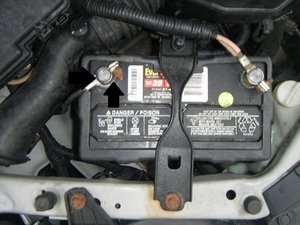
  • Remove the connections from both the negative and the positive terminals of the battery
  • When removing the battery, the negative terminal must be removed first. When re-installing the battery, the positive must be connected first.
Шаг 3 · фото 1
3
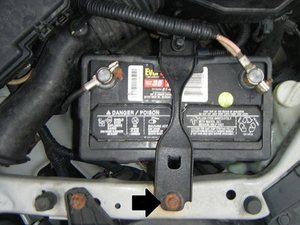
  • Using a socket wrench, remove the battery bracket from the top of the battery.
  • Depending on the condition of the car, the bolts may be rusted, making the removal of them a challenge.
Шаг 4 · фото 1
4
  • Ensure that there are no connections remaining on the battery.
  • Lift up the battery and remove it from the battery tray.

Завершение

To reassemble your device, follow these instructions in reverse order.

Контент гайда принадлежит iFixit, лицензия CC BY-NC-SA. Открыть оригинал

2001-2005 Honda Civic Battery Replacement — Carvin Garage · Carvin