- Park the truck on a level surface.
- Turn the front wheels all the way to the right.
- Put the truck in Park (automatic transmission) or 1st gear (manual transmission).
- Set the parking brake.
- Open the hood to allow the engine to cool off faster before proceeding.
2005–2015 Toyota Tacoma 2.7L Alternator Replacement
This guide covers the procedures to replace the alternator in a 2005-2015 Toyota Tacoma with the 2.7L (2TR-FE) engine. Replacing the alternator in a 2.7L Tacoma is a fairly simple process that most owners can do with a few common tools and a little patience. This guide was specifically designed for readers who are performing this replacement for the first time and have a basic understanding of automotive terminology.
The alternator is a crucial part of a vehicle's electrical system. It is responsible for charging the battery and powering all electrical systems when the vehicle is running. As a vehicle gets older, it is common to have to replace the alternator when it wears out. Common symptoms of a failed or failing alternator include:
- A weak start or no start due to a discharged battery
- The charging system (battery) light is on
- Loss of power when driving
- Additional dash lights on or malfunctioning systems (due to a lack of power to the respective systems)
- Engine stalling
There are a few safety hazards in this procedure such as vehicle rollaway and the electrical system. Steps one and two address the safety hazards.
Additional information regarding the belt and tensioner in step 6 can be found on the Tacoma World website.
Пошаговая инструкция
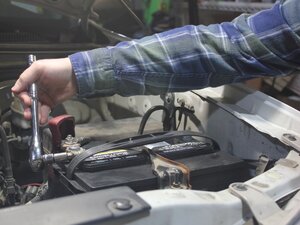
- Use the 10mm socket and ratchet to disconnect the negative (black) battery terminal first and the positive (red) battery terminal second.
- ***Reassembly Note:*** When reconnecting the battery, attach the positive (red) terminal first.
- Locate the alternator in the passenger side front area of the engine bay.
- Remove the green connector.
- Remove the gray cap by pushing it away from the wiring harness.
- With the gray cap removed, use the 12mm socket, 6" socket extension, and ratchet to remove the exposed nut and alternator harness wire.
- This nut may need to be reused. Check to see if your new alternator comes with a new harness wire nut.
- Locate the bolt head on the belt tensioner below and to the right of the alternator and put the box end (fully enclosed end) of the 14mm wrench over the bolt head.
- Image 2 shows a better view of the bolt head after the belt has been removed.
- This is not a removable bolt. This is a bolt head which has been molded onto the tensioner arm.
- Use one hand to pull up on the 14mm wrench to loosen the spring-loaded tensioner (Image 1) and use the other hand to slip the belt off of the alternator pulley (Image 2).
- The bolt that the wrench is on is not a removable bolt. This bolt moves the entire tensioner.
- ***Reassembly Note:*** When putting the belt back on the alternator pulley, ensure that the belt is routed correctly and that the belt grooves are seated correctly. An additional useful link can be found in the description.
- Use the pop rivet removal tool (or a flathead screwdriver) to remove the three plastic pop rivets holding up the rubber access cover in the passenger side wheel well.
- It is common for plastic pop rivets to break when removed.
- Remove the top bolt on the alternator using the 14mm socket and ratchet.
- Reaching through the fender access hole, support the alternator with one hand and remove the bottom alternator bolt using a 14mm socket and ratchet.
- Remove the alternator through the fender access hole.
- If it is difficult to remove the alternator from the bottom bracket after removing both bolts, rock it back and forth.
- Verify that the gray cap, connector nut, top alternator bolt, pop rivets, and bottom alternator bolt have been removed.
- Install the new alternator by following the guide steps in reverse order and following any reassembly notes.
- After finishing installing the new alternator, start the truck to verify that the charging system light (battery light) is off.
Завершение
To reassemble your device, follow these instructions in reverse order.
Контент гайда принадлежит iFixit, лицензия CC BY-NC-SA. Открыть оригинал