- Press the silver button on the back of the key fob.
- While pressing the silver key, pull out the physical key.
Subaru Smart Key Fob Model 14AHK Battery Replacement
If your Subaru key fob model 14AHK (printed on the back of the fob) is not unlocking, locking, or starting the car, it may need a new battery. Your vehicle may also display a low key fob battery warning message.
The Subaru smart key fob model 14AHK is compatible with many modern Subaru vehicles equipped with push-to-start ignition systems. Some Subaru models from 2014–2018 use a similar-looking key fob (FCC ID: HYQ14AHC), but it operates on a different frequency. Be sure to confirm your key fob model before purchasing a replacement battery.
This guide explains how to replace the battery yourself. You will need a CR2032 battery and a plastic pry tool to complete the replacement.
Dispose of the old battery properly at a battery recycling center or an approved battery drop-off location.
Инструменты (1)
- Plastic pry tool (recommended) купить ↗
Запчасти (1)
- CR2032 Lithium Battery купить ↗
Пошаговая инструкция
- Use the physical key to pry and twist the back cover off.
- Use gentle pressure to avoid breaking the back cover.
- Remove the control board from the key fob.
- Keep in mind the direction of the control board as it needs to be reassembled in the same direction.
- Use a plastic pry tool to lift the battery out of place.
- Remove the old battery.
- Use gentle pressure here to avoid breaking the clips that hold the battery in place.
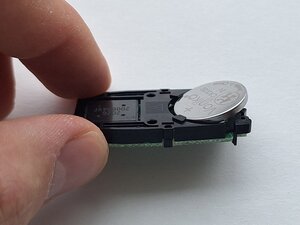
- Insert the new battery at an angle.
- Press down on the raised side of the battery until it snaps into place.
- Reinstall the control board into the key fob with the same orientation as before.
- Align the back cover and press firmly around the edges to secure it in place.
- Reinsert the physical key.
- Test the key fob by pressing a button and looking for a red light to light up in the top left corner.
Контент гайда принадлежит iFixit, лицензия CC BY-NC-SA. Открыть оригинал