CARVIN
Moderate45 min - 1 h12 steps·Original on iFixit ↗

How to Replace a Corroded Car Battery Terminal

Is your car having trouble starting? Is there corrosion build-up on your terminals, preventing a proper connection? This handy guide will help you remove the troublesome terminal and replace it with a brand new one.

Warning: It is dangerous to work on a vehicle battery. Exercise extreme caution when following this guide.

Tools (2)

Parts (1)

Step-by-step instructions

Step 1 · photo 1Step 1 · photo 2
1
  • '''Remember to remove your car key from the ignition and shut off the car before performing this guide.'''
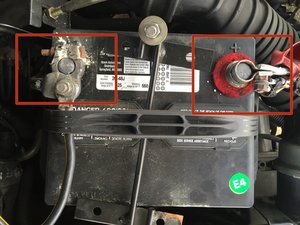
  • Locate the terminals on the top of the car battery. Next to each terminal is a positive(+) or negative(-) sign, indicating the charge.
  • The positive terminal looks to be in working order, but the negative end has a lot of corrosion buildup. This terminal needs to be replaced.
Step 2 · photo 1Step 2 · photo 2
2
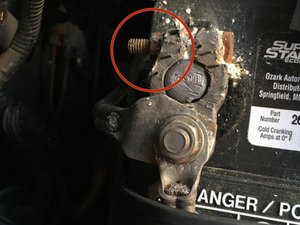
  • Find the nut located on the side of the terminal.
  • Using an adjustable wrench, rotate the nut counterclockwise to loosen it.
  • Use an appropriately-sized wrench or socket, not channel locks as shown in the photo.
  • You do not need to loosen the nut all the way off the bolt, but just enough to loosen the terminal's grip on the node.
Step 3 · photo 1Step 3 · photo 2
3
  • '''Always remember to remove the negative terminal first before the positive terminal.''' This will prevent shorting to the ground and possibly causing shock or a fire.
  • Carefully use a rag to lift up the terminal off of the battery node.
  • Be cautious when handling battery corrosion, as it can irritate the skin and is harmful if it comes in contact with your eyes.
  • Place the terminal on a rag or towel and '''make sure it doesn't come in contact with the battery node.'''
Step 4 · photo 1Step 4 · photo 2
4
  • On the positive terminal, locate the nut along the side.
  • Using the wrench, rotate the nut counterclockwise.
  • You do not need to fully loosen the nut off the bolt, but just enough for the terminal to be easily removed from the node.
Step 5 · photo 1Step 5 · photo 2
5
  • Using a rag, carefully remove the positive terminal from the battery node.
  • Place the terminal on a rag or towel, and make sure it does not come into contact with the battery node.
Step 6 · photo 1Step 6 · photo 2Step 6 · photo 3
6
  • On the negative terminal, locate the nut on the side facing upwards.
  • Using the wrench, rotate the nut counterclockwise and remove it from the bolt.
Step 7 · photo 1Step 7 · photo 2Step 7 · photo 3
7
  • Take the wire plate on top and remove it carefully from the bolt.
  • At this point, it is fine to handle the metal plate with your hands since the terminals are disconnected from the battery and there is nothing completing the circuit.
  • Remove the bottom wire plate from the bolt, placing it carefully to the side.
Step 8 · photo 1Step 8 · photo 2
8
  • Set aside the old battery terminal, and replace it with the new one.
  • Replace the wire plates in the order they were taken off.
  • Although it is not necessary that the plates be placed in the same order again, it is generally a good idea to go with the order that it came in.
Step 9 · photo 1Step 9 · photo 2
9
  • Place the flat washer and the screw-on head that came with the battery terminal onto the vertical bolt.
  • Tighten the head clockwise and make sure the wire plates are secured.
  • Not all battery terminal packs come with a washer and screw-on head. If your pack comes with a nut, use the wrench and tighten the bolt clockwise.
Step 10 · photo 1
10
  • Using a rag, place the positive terminal back onto the positive node.
Step 11 · photo 1
11
  • Place the negative terminal back onto the negative node.
Step 12 · photo 1Step 12 · photo 2Step 12 · photo 3
12
  • On the negative terminal, use the wrench to rotate the side nut clockwise to tighten it.
  • Next, perform the same action on the side nut of the positive terminal.
  • To ensure a secure connection, be sure the nut is snug and that the terminal can't come off easily.

Guide content belongs to iFixit, license CC BY-NC-SA. Open original