CARVIN
Easy2 - 3 minutes4 шагов·Оригинал на iFixit ↗

2012-2015 Honda Civic Key Battery Replacement

Use this guide to replace the key battery for a 2012-2015 Honda Civic.

Инструменты (2)

Запчасти (1)

Пошаговая инструкция

Шаг 1 · фото 1Шаг 1 · фото 2
1

Unscrew battery cover

  • Lay the key down so that the Honda symbol is facing upward.
  • Use a Phillips #0 screwdriver to remove one screw.
Шаг 2 · фото 1Шаг 2 · фото 2
2

Pry the cover off

  • Insert the flat end of your spudger into the notch in the side of the key/remote.
  • Pry the key remote apart to remove the cover.
Шаг 3 · фото 1
3

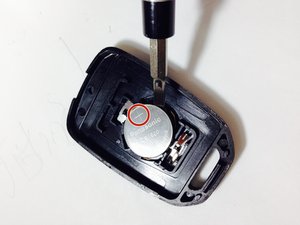
Replace the battery

  • Before you remove the battery, note which side faces up (+ or -). You should install your replacement the same way.
  • Remove the battery.
  • Your key may contain either a CR1616 or CR1620 battery. In some cases, either type will work, but for the best results, replace it with the same kind of battery that originally came with your key.
  • Install your matching new battery in the same orientation as the original.
Шаг 4 · фото 1
4

Reassembly

  • Place the two halves of the remote cover back together.
  • Press the unlock or lock buttons to make sure the remote is working.
  • Place the screw into the hole and tighten with a Phillips #0 screwdriver.

Завершение

To reassemble your device, follow these instructions in reverse order.

Контент гайда принадлежит iFixit, лицензия CC BY-NC-SA. Открыть оригинал

2012-2015 Honda Civic Key Battery Replacement — Carvin Garage · Carvin