CARVIN
Easy10 minutes5 шагов·Оригинал на iFixit ↗

2004-2008 Mazda RX-8 Battery Replacement

This replacement guide will teach you how to how to replace the battery, safely, in a few easy steps.

Инструменты (1)

Запчасти (1)

Пошаговая инструкция

Шаг 1 · фото 1Шаг 1 · фото 2Шаг 1 · фото 3
1
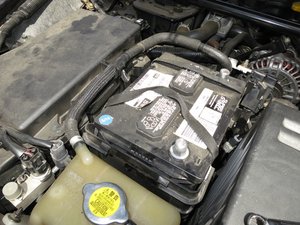
  • Find black tabs that lock Battery cover into place.
  • The tabs should snap off easily.
Шаг 2 · фото 1Шаг 2 · фото 2
2
  • Use the 10 mm wrench to disconnect the negative battery terminal, followed by the positive terminal.
  • It is '''vital ''' to disconnect the negative terminal before interacting with the battery. Make sure not to bridge the two terminals with your wrench or other tools.
  • Remove the terminals once nuts are completely loose.
Шаг 3 · фото 1
3
  • Remove Battery terminals.
Шаг 4 · фото 1
4
  • Using the '''10mm Wrench''' remove gold nuts that hold the retention bar in place.
Шаг 5 · фото 1
5
  • After removing the bar pull the dead battery out '''using the black straps'''.

Завершение

After replacing the device, follow these instructions in reverse order to secure a new battery in its place.

Контент гайда принадлежит iFixit, лицензия CC BY-NC-SA. Открыть оригинал

2004-2008 Mazda RX-8 Battery Replacement — Carvin Garage · Carvin