CARVIN
Moderate10 min9 steps·Original on iFixit ↗

Bose SoundLink Mini Battery Cover Replacement

The battery cover is the rubber flap on the bottom of the speaker that covers the battery. It cannot be pulled off without first going through several prerequisite steps. This guide will provide you with easy to follow steps to remove the battery cover on the Bose SoundLink Mini speaker.

Tools (2)

Parts (1)

  • Bose SoundLink Mini Battery (063287/063404) buy ↗

Step-by-step instructions

Step 1 · photo 1
1
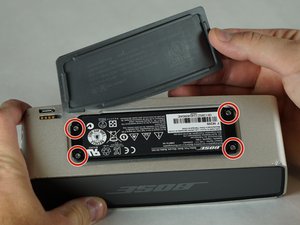
  • Peel back the rubber battery cover and remove the four circled 6.0 mm screws using a T8 Torx Screwdriver.
Step 1 · photo 1
1
  • Insert the Metal Spudger between the rubber edge on the grille and the aluminum casing.
  • Place Metal Spudger in the location shown.
Step 1 · photo 1Step 1 · photo 2
1
  • Remove the four 15.0 mm screws on the left and the four 9.0 mm screws on the right using the T8 Torx Screwdriver.
Step 2 · photo 1Step 2 · photo 2
2
  • While holding the cover back, pull straight up on the battery to remove it.
Step 2 · photo 1Step 2 · photo 2
2
  • Slowly pry up the grille until the two tabs shown pop out.
  • Be very gentle, the grille will bend.
Step 2 · photo 1Step 2 · photo 2
2
  • Remove the circuit board by pushing it with your index finger in the direction shown while using a nylon or metal spudger to lift it up and out of place.
Step 3 · photo 1Step 3 · photo 2
3
  • The grille is attached to the speaker with double sided sticky tape. To remove the grill gently pull upward while keeping tension to the right.
  • Be very gentle, the grille will bend.
Step 3 · photo 1Step 3 · photo 2
3
  • Carefully pull on the battery cover until the rubber tab slides out of the aluminum casing.
Step 4 · photo 1Step 4 · photo 2
4
  • Repeat steps to remove the back grille.

Conclusion

To reassemble your device, follow these instructions in reverse order.

Guide content belongs to iFixit, license CC BY-NC-SA. Open original

Замена крышки батарейного отсека Bose SoundLink Mini — Carvin Garage · Carvin