CARVIN
Difficult25 - 35 min13 steps·Original on iFixit ↗

Vtech Kidizoom Smart Watch DX Battery Replacement

Battery dead, or not holding a charge? Follow this guide to replace it with a new one! Note: This guide requires soldering.

Tools (5)

Step-by-step instructions

Step 1 · photo 1
1
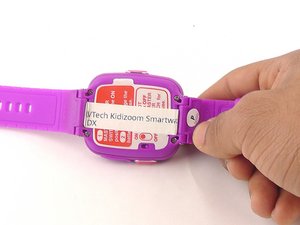
  • Make sure the master switch is "OFF" before disassembly, to avoid an electric shock.
  • Flip the watch over with the back facing up.
Step 1 · photo 1Step 1 · photo 2
1
  • The speaker wires are fragile. They may break if excessive force is used to remove the circuit board.
  • Removal of the circuit board requires [https://www.ifixit.com/Guide/How+To+Solder+and+Desolder+Connections/750|soldering].
  • Gently push on the display from the front, near the camera. The circuit board and display will pop out through the back.
Step 1 · photo 1Step 1 · photo 2
1
  • Using the plastic opening tool, gently pry the edges of the battery away from from the circuit board.
  • There is a thin layer of adhesive holding the battery to the circuit board. This will remain sticky after prying.
Step 2 · photo 1
2
  • Remove the four 6.0 mm screws on the back plate with the Phillips #00 screwdriver.
Step 2 · photo 1
2
  • Lift the circuit board carefully from the casing, without breaking or detaching the speaker wires at the bottom of the circuit board.
Step 2 · photo 1
2
  • De-solder the red battery wire from the circuit board.
Step 3 · photo 1
3
  • Gently pull the back plate from the watch casing.
Step 3 · photo 1
3
  • Note which wire is connected to which lead before continuing. There are no markers on the circuit board to indicate where each wire belongs.
  • De-solder the black speaker wire from the circuit board.
Step 3 · photo 1
3
  • Repeat the de-soldering for the black (ground) wire.
Step 4 · photo 1Step 4 · photo 2
4
  • Lift the master switch from the circuit board.
Step 4 · photo 1
4
  • De-solder the red speaker wire, as in the previous step.
Step 4 · photo 1
4
  • Pull the battery free, and wait for the solder to cool before handling further.
Step 5 · photo 1
5
  • Wait for the solder to cool down and solidify, then remove the circuit board from the casing.

Conclusion

To reassemble your device, follow these instructions in reverse order.

Guide content belongs to iFixit, license CC BY-NC-SA. Open original

Замена батареи Vtech Kidizoom Smart Watch DX — Carvin Garage · Carvin