CARVIN
Very difficult30 min - 3 h5 steps·Original on iFixit ↗

Bose SoundLink Mini II Battery Replacement

WARNING: This device has a hardwired battery motherboard connection. To replace a battery you need access to the technicians manual and a proprietary software called 'Polycomm'. Do not attempt replacement without already having the software. See the image from step five for advisement.

Speaker not turning on? This guide will help you replace the battery of the Bose Soundlink Mini II.

Note: Removing and reinstalling the battery requires the use of a soldering iron and a lot of careful disassembly. It is also necessary to download a specific type of proprietary software called 'Polycomm' and to follow the Bose technician's repair instructions provided to them by the company. Extremely difficult to source such software, let alone the instructions.


Tools (6)

Parts (1)

  • Bose SoundLink Mini II Battery buy ↗

Step-by-step instructions

Step 1 · photo 1Step 1 · photo 2
1
  • Flip the speaker over onto its back.
Step 2 · photo 1Step 2 · photo 2
2

Remove the rubber base

  • Gently remove the rubber base from speaker by pulling around the edges.
Step 3 · photo 1Step 3 · photo 2
3
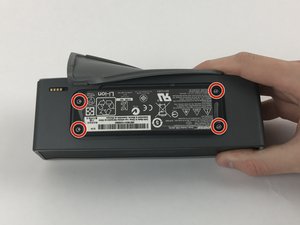
  • Remove the four 6mm T9 Torx bit screws from the corners of the battery.
Step 4 · photo 1Step 4 · photo 2Step 4 · photo 3
4
  • Carefully lift the battery from the side nearest the four gold contact pins, but don't try to fully remove it yet.
  • At this point, the battery remains connected via four wires to the power supply board.
  • Carefully desolder the four wires from the power supply board in order to completely detach the battery. There is very little room for the soldering iron without damaging the case or the board; you may want to remove the board first.
  • For help with soldering, see the [https://www.ifixit.com/Guide/How+To+Solder+and+Desolder+Connections/750|soldering guide|new_window=true].
  • Alternatively, you may remove the battery and power supply board together, without any soldering, but access requires some [https://www.ifixit.com/Guide/Bose+SoundLink+Mini+II+Speaker+Replacement/86117#s162304|additional disassembly] while carefully leaving the battery connected via the wires the entire time.
Step 5 · photo 1
5

Bose Technicians' Instruction Manual

  • Bose Technicians Instruction Manual: https://riverparkinc.com/wp-content/uploads/2016/02/SLminiII_SM.pdf

Conclusion

To reassemble your device, follow these instructions in reverse order.

Guide content belongs to iFixit, license CC BY-NC-SA. Open original

Замена аккумулятора Bose SoundLink Mini II — Carvin Garage · Carvin