CARVIN
Easy5 min3 steps·Original on iFixit ↗

Samsung Level Box Mini Battery Replacement

If the Samsung Level Box Mini is not charging, not turning on, or if the battery is losing power rapidly, then the batteries may require replacement.

Tools (3)

Parts (1)

  • Samsumg 3.7V Lithium Ion Batteries buy ↗

Step-by-step instructions

Step 1 · photo 1Step 1 · photo 2
1
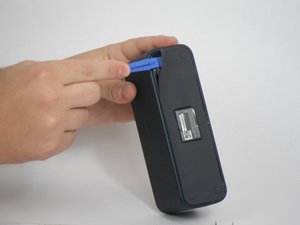
  • Using a plastic opening tool, go around the edges of the rubber bottom. Insert the same tool under the edge of the rubber and swivel side to side. Continue moving it forward while peeling the plastic off with the precision [product|IF145-020|tweezers].
Step 2 · photo 1
2
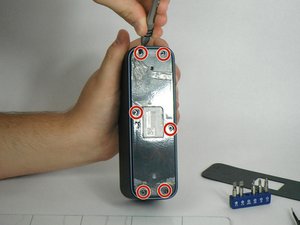
  • Remove the six 4.5 mm Philips #1 screws from the bottom plate using the Screwdriver J00. Take off the bottom plate.
Step 3 · photo 1
3
  • Using the plastic opening tool, remove the batteries from the device.

Conclusion

To reassemble your device, follow all the instructions in the reverse order. Use adhesive to stick the rubber back onto the bottom of the device.

Guide content belongs to iFixit, license CC BY-NC-SA. Open original

Замена аккумулятора Samsung Level Box Mini — Carvin Garage · Carvin