


1
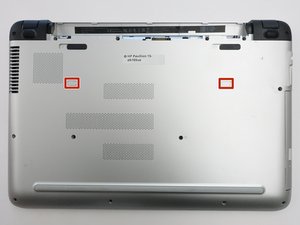
- Flip the computer over so that the bottom cover is facing you.
- Slide the two locks to the "unlock" position and remove the battery.
Most components that need to be replaced are inside the base of the laptop. The computer will need to be disassembled in order to reach the inner components. You will remove the battery before delving into the innards of your computer. If you just came here for a battery guide, simply follow to step two and then reassemble!




To reassemble your device, follow these instructions in reverse order.
Контент гайда принадлежит iFixit, лицензия CC BY-NC-SA. Открыть оригинал